
FL Smart ID: Thales3.5.0 - App Store
You'll be able to see results in few seconds.
Publisher Description
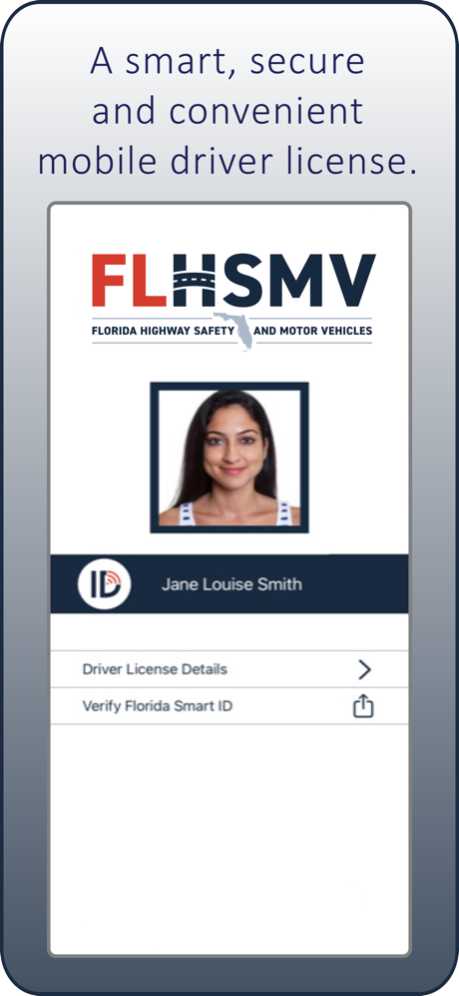
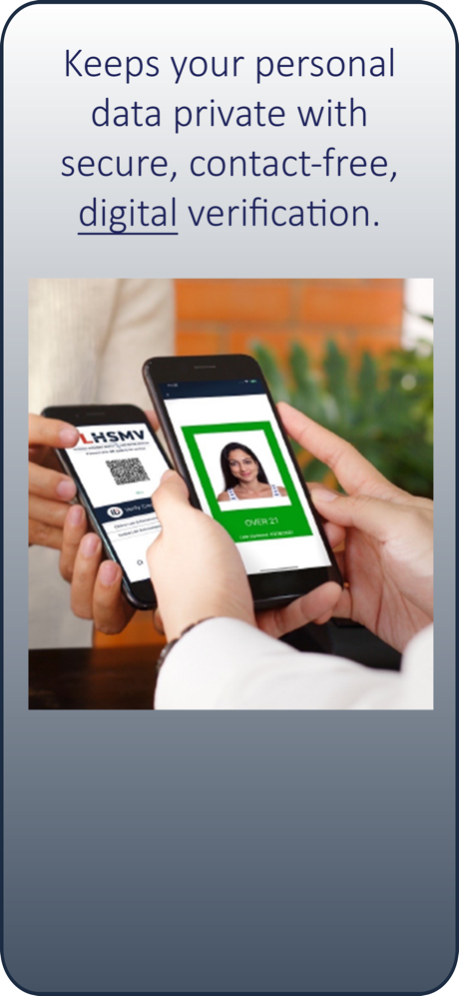
Florida Smart ID by Thales is an official app-based version of your Florida driver license, and a secure, convenient and contactless way to display proof of identity or age.
After downloading and activating, users can launch Florida Smart ID on their smartphone or other smart device, select the type of verification needed, and present it for scanning by a business or law enforcement. Your smart device does not leave your hand when being verified, making Florida Smart ID a contact-free and convenient way to display proof of identity or age.
Although Florida Smart ID by Thales is an official credential offered by the Florida Department of Highway Safety and Motor Vehicles, it does not replace your Florida driver license. Florida law requires carrying the physical driver license when operating a motor vehicle.
Device and Identification Requirements
• iPhone 6+ Bluetooth v4.2+
• Near Field Communication
• Internet Connectivity for Updates
• Driver License or Identification Card must be valid, Real ID compliant
How to Activate
Enroll in Florida Smart ID within the app OR through your MyDMV Portal account.
In-app enrollment will require you to take a photo of your driver license or ID card and a photo of yourself to verify your identity via facial recognition technology.
If you’d prefer, you can use you MyDMV Portal account to enroll and activate. (You will receive an email with an activation code.)
Complete the setup of your Florida Smart ID by creating a six-digit PIN using the randomized keypad for additional security.
Powered by Thales, a leader in digital identity and security worldwide, Florida Smart ID is a convenient and secure digital companion to your current Florida driver license. Similar to your physical Florida driver license or ID, your Florida Smart ID can be used whenever you need to confirm your driving privilege, your identity or proof of your age.
This includes:
• Proving your identity and driving privileges during a traffic stop with Law Enforcement.
• Proving your age to a retailer when purchasing age-restricted items like alcohol or tobacco, or when entering age-restricted venues like bars or casinos.
SECURE
Florida Smart ID by Thales uses strong security standards along with digital verification processes to ensure your personal information is always kept safe. This advanced technology offers much better protection against counterfeiting or fraud than a simple digital image of your Florida driver license.
CONVENIENT
Because your smartphone is always with you, so is your Florida Smart ID. No more shuffling through your wallet to find your license. No more handing your license to someone else. When you use your Florida Smart ID, your smartphone or smart device stays in your hands. You’re always in control.
SMART
With Florida Smart ID by Thales, your personal data remains private. Only the information necessary for each situation is shared. For instance, if you are purchasing alcohol or entering a bar, Florida Smart ID only shares your photo and confirmation that you meet the age requirement. Unlike when using your physical ID, other personal information, such as your name, date of birth or address, are kept private and are not shown to the person checking your Florida Smart ID.
More information is at flhsmv.gov/FloridaSmartID.
Mar 20, 2024
Version 3.5.0
license update
About FL Smart ID: Thales
The company that develops FL Smart ID: Thales is Florida Department of Highway Safety and Motor Vehicles. The latest version released by its developer is 3.5.0.
To install FL Smart ID: Thales on your iOS device, just click the green Continue To App button above to start the installation process. The app is listed on our website since 2024-03-20 and was downloaded 0 times. We have already checked if the download link is safe, however for your own protection we recommend that you scan the downloaded app with your antivirus. Your antivirus may detect the FL Smart ID: Thales as malware if the download link is broken.
How to install FL Smart ID: Thales on your iOS device:
- Click on the Continue To App button on our website. This will redirect you to the App Store.
- Once the FL Smart ID: Thales is shown in the iTunes listing of your iOS device, you can start its download and installation. Tap on the GET button to the right of the app to start downloading it.
- If you are not logged-in the iOS appstore app, you'll be prompted for your your Apple ID and/or password.
- After FL Smart ID: Thales is downloaded, you'll see an INSTALL button to the right. Tap on it to start the actual installation of the iOS app.
- Once installation is finished you can tap on the OPEN button to start it. Its icon will also be added to your device home screen.
Program Details
General
System requirements
Download information
Pricing
Version History
version 3.5.0
posted on 2024-03-20
Mar 20, 2024
Version 3.5.0
license update
version 3.4.0
posted on 2023-12-02
Dec 2, 2023
Version 3.4.0
Bug fixes and minor UI enhancements
version 3.3.0
posted on 2023-11-16
Nov 16, 2023
Version 3.3.0
Bug fixes and UI enhancements
version 3.2.11
posted on 2023-09-29
Sep 29, 2023
Version 3.2.11
Bug fixes
version 3.1.0
posted on 2023-06-15
Jun 15, 2023
Version 3.1.0
Bug fix
version 3.0.26
posted on 2023-06-10
Jun 10, 2023
Version 3.0.26
New features in this release for Holder are:
· Online Authentication
· Car Registration and Insurance
version 2.8.0
posted on 2023-03-25
Mar 25, 2023
Version 2.8.0
Bug fixes
version 2.4.9
posted on 2022-07-25
Jul 25, 2022 Version 2.4.9
Bug fixes
version 2.2.1
posted on 2022-04-20
Apr 20, 2022 Version 2.2.1
bug fixes
version 2.1.9
posted on 2022-04-12
Apr 12, 2022 Version 2.1.9
Bug fixes
Disclaimer
Official App Store Link
We do not host FL Smart ID: Thales on our servers. We did not scan it for viruses, adware, spyware or other type of malware. This app is hosted by Apple and passed their terms and conditions to be listed there. We recommend caution when installing it.
The App Store link for FL Smart ID: Thales is provided to you by apps112.com without any warranties, representations or guarantees of any kind, so access it at your own risk.
If you have questions regarding this particular app contact the publisher directly. For questions about the functionalities of apps112.com contact us.
